
Version: 2019 (5.71)
System requirements :
 Windows 10, Windows 8, 7, Windows Server 2012, 2008 and 2003, Windows Vista, Windows XP, Windows 2000 and NT4.
Any computer capable to load Windows™ successfully
Licensing :
Personal :
24.99 € (US$ 28.60) Buy now
Professional :
199 € (US$ 228.00) Buy now
Unlimited upgrades for licensed users !




|
 Releases 5.40 (2011/01/04), 5.41 (2011/04/17), 5.42 (2011/09/24), 5.43 (2012/04/13) Releases 5.40 (2011/01/04), 5.41 (2011/04/17), 5.42 (2011/09/24), 5.43 (2012/04/13)
Version 5.41 new features are displayed in green.
Version 5.42 new features are displayed in orange.
Version 5.43 new features are displayed in red.
Evolutions
WIT documents management
-
The place where WIT stores its help files, temporary and preview pages can be moved (WIT advanced options).
-
Recent document list has now 10 elements (instead of 4).
Ideas management
- When merging child ideas, title numbering of children is relative to parent idea.
- Full support of Freeplane software (mind maps), compatible with Freemind.
- While importing Freeplane/Freemind maps, ideas internal identificators (and therefore web page file names) are inherited from their titles.
- New Freeplane "Details" field in mind maps now imported.
- Checking an idea for eligibility in the table of contents also makes it eligible for main index and faceted indexes, and also for web site building (new behavior : unchecked
ideas are ignored).
- Indexes (keywords, facets and glossary) are now diplayed in two columns by default (except for Internet Explorer 9 which does not respect CSS 3 yet). New CSS style elements are introduced in the style template to control them.
Faceted classification of ideas
Idea editing
-
New WIT variables for the new Creation Dates Widget and the new Revision
Dates Widget.
-
Links to publicationscan now be dragged and dropped between ideas.
-
Display tab : when an idea is unckecked, it is not only hidden in the table of contents, but also ignored when the web site is generated (new behavior).
-
Display tab : the images of an idea can now be hidden (not be displayed) in the image table of contents (professional
license).
-
When a fragement (text + images) is pasted from a web page on the Internet, a link to this source page is automatically added to the curent idea external URLs.
-
Copy and paste of idea format are now accessible through keyboard shortcuts.
-
Search function has now "case sentivive" and "whole word only" options.
-
Search and replace function has now a "case sensitive" option.
Structure templates
-
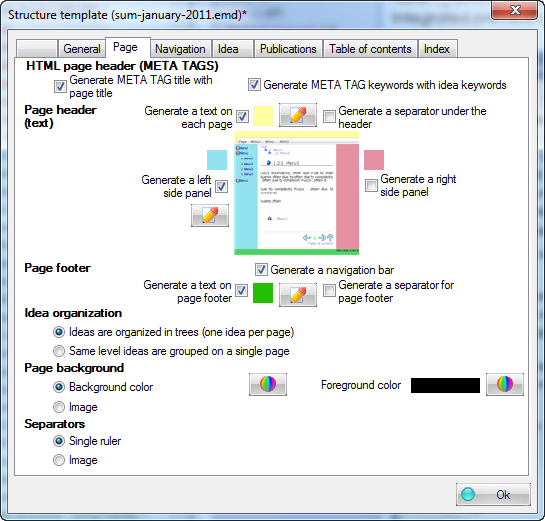
The " Page" tab in the stucture model has been reorganized
Fixed bugs
Major
- XML Freemind import of attributes fixed : some values were overwritten.
- Custom fields configuration : latest changes to field values could be lost after changing fields names.
- When an idea had "index" as title, its default ID would conflict with the website root.
- Custom fields and faceted indexes: strings with same substrings would cause confusion in index links.
- Adding keywords while editing idea text within the main WYSIWYG editor would cause loss of latest changes.
- WIT would crash while generating table of contents and indexes preview if the "Ctrl+Shift+E" keys were pressed twice.
- Merge of ideas with identical faceted values would make duplicates.
Minor
- Automatic keywords gathering: automated names of inserted images are now ignored.
- Automatic keywords gathering: document and image legends are now taken in account.
- Automatic keyword gathering: HTML tags and their attributes are no more taken in account.
- Import folders: when the treeview had not the focus, this function imported images instead of folders.
- Wrong label on Export XML menu in English version.
- XML import / export: the table of contents eligibility attribute for ideas was not taken in account.
- Search criteria dialog: the "assigned to" field was omitted.
- Problem with "My Documents" folder after an upgrade of Windows XP. WIT temporary folder "My Web Idea Tree" does not depend any more on "My Documents", has been renamed into "WIT" and placed in the AppData/Roaming directory of the user's
profile.
- WIT documents, created from the same copy, and simultaneously edited, would cause conflicts when previewing indexes and toc.
- Better centering of Freemind/Freeplane mind maps in the Flash plug-in.
- Semicolon ";" can also be a keyword separator in the publication manager.
- Fixed an anomaly when generating images in the bibliographies.
- When saving a document under a new name (save as) and when its resources are copied in the new document, the images that are included in the publications are also copied.
- Fixed a compatibility problem when capturing images with SnagIt 10.
- In the "Links" tab of ideda properties, it was impossible to remove a link to an image if its legend as void.
- Very long idea titles could lead to generated file names that were too long for Windows (the 255 character limit still exists in Windows 7 !) : file names are now truncated to the 70 first characters in order to defer this
problem.
- Fixed flickering of progress window refresh (web site generating, index building).
- Fixed compatibility issue when exporting XML to Freeplane.
- Fixed void entries in the index, faceted index and glossary when ideas are not checked for display (hidden).
|
 1 / 36


 3.
3.