
• WIT, information manager, website builder
  • Features
  • Screenshots
  • Download
  • Buy now
  • Support
  • WIT in the Press
  • Links
Mind Map of WIT usages and features Features (summary)
Main screen Editing idea text Editing idea properties Linking images Automatic index Image table and bibliography manager Structure template editing All languages support (Unicode)
Download FreeWIT History of changes
Buy now your personal or professional license Money back Guarantee Personal, professional, and freeware licenses
FAQ and User's Manual WIT Tutorials A word from the author...
Opinions of Happy Users Users' reviews Press Reviews Press Release
Sample web sites, made with WIT Link to WIT home site Web site development, internet resources links


Current version : 5.43.2
Benefits

Features
Screenshots
Download
Buy now
Money back Guarantee
FAQ, Online Help
Tutorials
Support
Press book

WIT sample sites
FreeWIT, the free version is back ! 
System requirements :

  Windows 8, 7, Windows Server 2008 and 2003, Windows Vista, Windows XP, Windows 2000 and NT4.

  Any computer capable to load Windows™ successfully
Licensing :

  Personal : 
24.99 € (US$ 34.99) Buy now

  Professional : 
199 € (US$ 269) Buy now

Unlimited upgrades for licensed users !
Contact :
Christophe Guibert
cguibert@webideatree.com

Association of Shareware Professionals 

Promaxum Seal of Quality Review, by Scott Swedorski, former Editor-in-Chief (and the founder!) of Tucows
www.softpedia.com


Designed and built with WebIdeaTree

Previous page
6.3.4. Oregon State Library (March 2003)   1  2  Next page
6.3.4.2. Figure 2 : index and controlled vocabulary Return
6.3.4. Oregon State Library (March 2003)
Site map  | Images
WIT, information manager, website builder
      6. WIT in the Press
          6.3. Press Reviews
              6.3.4. Oregon State Library (March 2003)
 Figure 1 : organization and presentation of information 
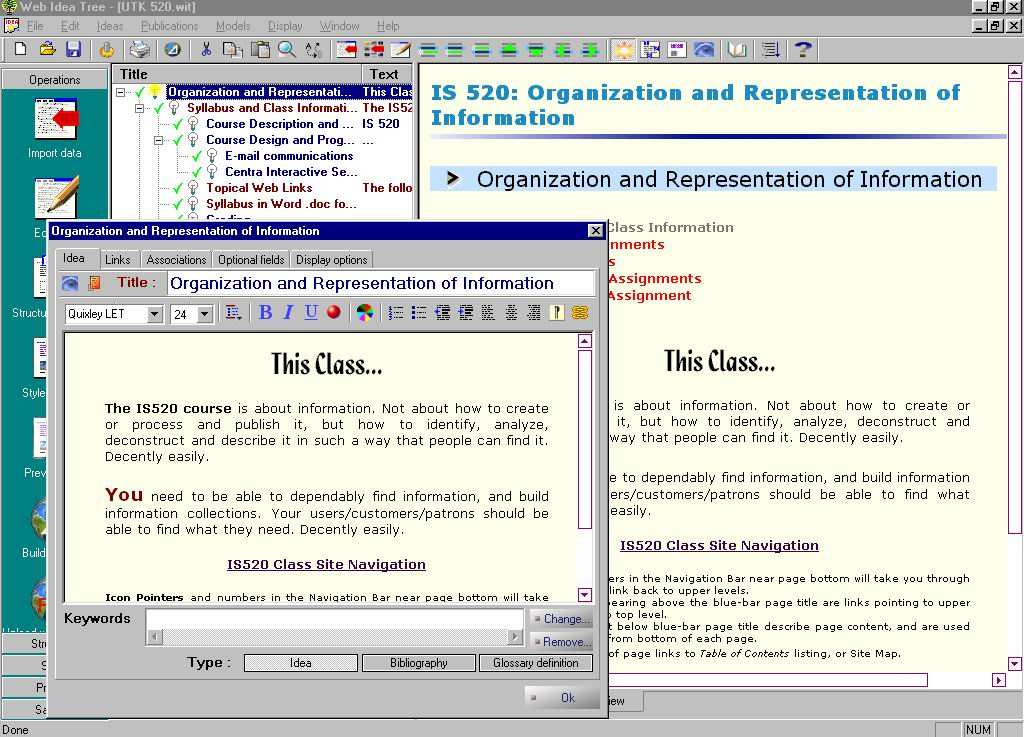
Figure 1 - WebIdeaTree working screen, showing 'idea' outliner partially covered by text editor window, with associated Page Preview on right side of screen.

| Benefits | Features | Screenshots | Download | Buy now | Tutorial | FAQ | History | Tech Support | Press book | Link to WIT home site | WIT sample sites |

© Christophe Guibert 2001-2013. All rights reserved. All rights reserved.
Last updated on 2013-01-13