


|
Tree :
Faceted index, by topics :
Menu
"Main" tree view (1) "Normal" view (15) Display (4) Edit (9) File (52) Help (7) Ideas (57) Import/Export (16) Keywords (6) Publications (19) Tasks (1) Templates (72) Windows (1)
Feature
Category
How to insert these widgets? |
 4.1.4. Import ideas 4.1.4. Import ideas Let's now automatically fill ideas describing A. Hitchcock's filmography, by using a simple database : a CSV text file with records made of fields and separating characters (delimiters). The delimiter is a '\t' (tab) character, and the fields of the CSV field are :
First, click on the "Film works" idea. In the "Import/Export" menu select the "Import ideas from CSV file", and, in the dialog box, select the fields as shown in figure 6 : double click on chosen fields (or use "<<" and ">>" buttons), and set field order with "Up" and "Down" buttons. Repeat the selection of "Actor" field 8 times. You can set all these options at once by loading the predefined filter "Tutorial.iif" while using the "Load" button. Note that 'Genre' field in the data file has been mapped to "keywords" for each idea : it will be used as an index when the Web site is created. Validate. The chosen format is then shown in a message box. In case of error, cancel to go back to the previous dialog. Finally, select the data file : Projects/Tutorial/Hitchcock/films.txt. Imported data are transformed into child ideas of the current selection : here, all A. Hitchcock's films are placed under the "Film works" idea. 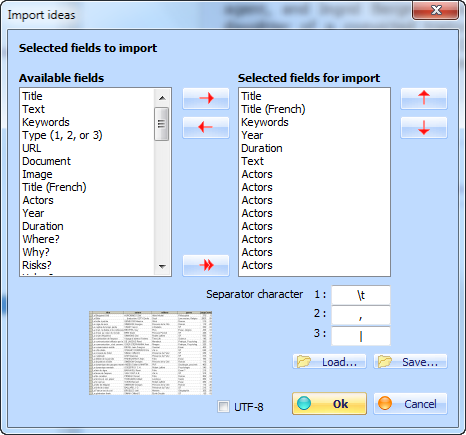 Figure 6 : import ideas.
Keywords : CSV ; Delimited text file ; Format (imported data) ; Importing ideas
|
 Title (English)
| Web Idea Tree 5.70 User's Manual - Page 43 / 485
Last update 01/12/2019 at 16:40:53 Copyright © Christophe Guibert 2001-2018. All rights reserved. |
 |