

|
Tree :
Faceted index, by topics :
Menu
"Main" tree view (1) "Normal" view (15) Display (4) Edit (9) File (52) Help (7) Ideas (57) Import/Export (16) Keywords (6) Publications (19) Tasks (1) Templates (72) Windows (1)
Feature
Category
How to insert these widgets? |
 5.5.3.6. Display options tab 5.5.3.6. Display options tab
This tab (figure 4.19) controls how the idea is shown (the options are applied to this page):
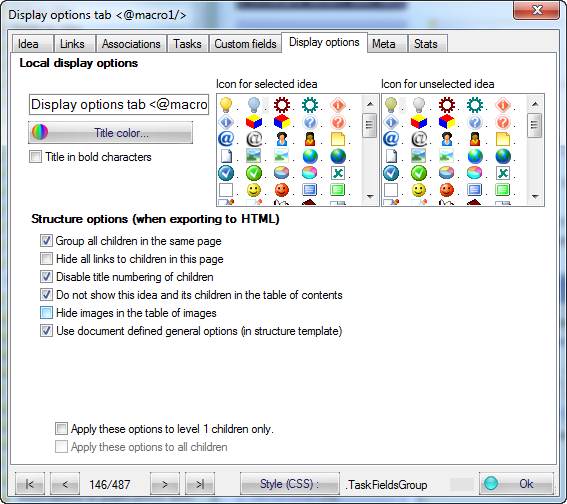 Fig 4.19 : Display options
See also :
Keywords : Presentation (idea) ; Properties (idea)
View display options
Below options affect only the idea display in the views. Title display in main view
Title display in main view can be modified by changing :
Keywords : Presentation (idea) ; Title
Choice of icon to display in main view and structure elements
Two icons are used when the idea is shown in the main view :
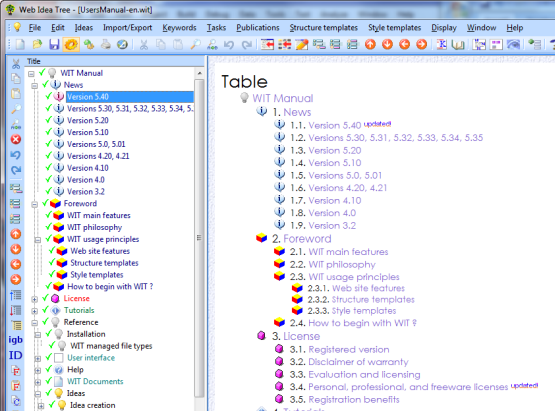
The second icon is also used at Web site generation time in the Java applet if the left side frame is used. In addition to default structure template icons and if the template allows it, the second icon decorates the following items at web site generation :
An example of this with the table of contents :
Keywords : Icon (idea)
Display options in Web site
These options affect the page rendering at Web site build time. They are used to control how child ideas of current idea will be generated :
They are also used to locally specialize background and foreground colors of an idea page (and optionally its children). Corresponding rules in current structure template are ignored :
Keywords : Background color ; Background image ; Foreground color ; Presentation (idea)
Display options recursive application
When the property dialog is validated, chosen display options may apply to :
Keywords : Presentation (idea)
|
||||||||||||||||||||||||||||||||||||||||||||||||||||||||||||
 5.
5.  in the views where ideas are displayed,

| Web Idea Tree 5.70 User's Manual - Page 149 / 485
Last update 01/12/2019 at 16:41:02 Copyright © Christophe Guibert 2001-2018. All rights reserved. |
 |