


|
Tree :
Faceted index, by topics :
Menu
"Main" tree view (1) "Normal" view (15) Display (4) Edit (9) File (52) Help (7) Ideas (57) Import/Export (16) Keywords (6) Publications (19) Tasks (1) Templates (72) Windows (1)
Feature
Category
How to insert these widgets? |
 5.2.4.3. Page preview view 5.2.4.3. Page preview view
This area is used by the HTML integrated display to give a preview of the final rendering of selected idea. It is activated / deactivated with Ctrl + Q key, or with the menu "Ideas/Preview (built-in browser)". The preview view is enhanced with help tags, giving access to useful WIT features :
The display of these icons is controlled by the menus "Display/Help tags" and "Display/Style tags (CSS)".
Note : the hypertext links, which are displayed in the this view are correct (refreshed) only if the user preference "Automatic built of preview pages (preview view)" is enabled. 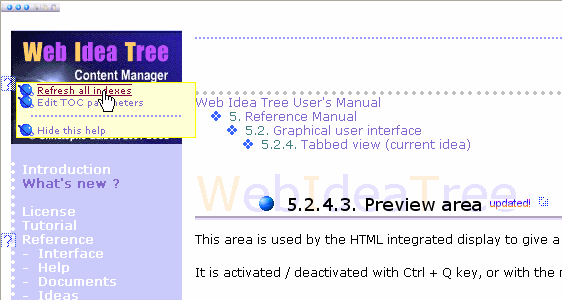 Preview view
Keywords : Help tags ; Html page ; Preview (idea)
|
||||||||||||||
 5.
5.  This icon displays a useful contextual menu when flown by the mouse pointer. The menu gives access to specific page objects.
 This icon, placed near an idea or page structure element, enables direct editing of its properties.
 This icon, placed near an idea or page structure element, enables direct editing of its CSS style.
 This icon, placed near an idea or page structure element, enables direct editing of its content.
 This icon is changed into
  when the mouse pointer reaches it :

| Web Idea Tree 5.70 User's Manual - Page 86 / 485
Last update 01/12/2019 at 16:40:56 Copyright © Christophe Guibert 2001-2018. All rights reserved. |
 |