


|
Tree :
Faceted index, by topics :
Menu
"Main" tree view (1) "Normal" view (15) Display (4) Edit (9) File (52) Help (7) Ideas (57) Import/Export (16) Keywords (6) Publications (19) Tasks (1) Templates (72) Windows (1)
Feature
Category
How to insert these widgets? |
 5. Reference 5. Reference 5.5. Ideas 5.5.3. Idea contents editing 5.5.3.9. Editing idea text : WYSIWYG editor 5.5. Ideas 5.5.3. Idea contents editing 5.5.3.9. Editing idea text : WYSIWYG editor  5.5.3.9.2. Insert internal links 5.5.3.9.2.3. Insert a link to an external URL 5.5.3.9.2. Insert internal links 5.5.3.9.2.3. Insert a link to an external URL
In the dialog, give a title to your link (it will be displayed in the human readable text), and type its URL address. WIT then inserts the necessary HTML code, at current cursor position. You can activate the HTML raw editor view (expert mode), to visualize the full HTML code. This feature is similar to external URLs association to idea properties.
Choose the URL type in the combo box. Then type the address in the next field. If you selected the URL type "file://", WIT shows the file selector box so you can choose a file on your computer.
Keywords : Urls
|
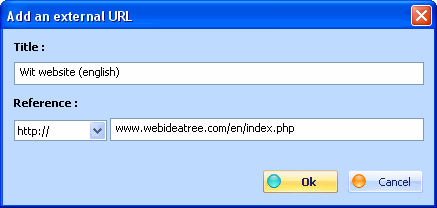 Optional : give a title in the first field. If some text is active in the WYSIWYG editor, WIT will keep it and ignore your title. If you do not provide a title, WIT will show the address in the
text.
Optional : give a title in the first field. If some text is active in the WYSIWYG editor, WIT will keep it and ignore your title. If you do not provide a title, WIT will show the address in the
text.
| Web Idea Tree 5.70 User's Manual - Page 157 / 485
Last update 01/12/2019 at 16:41:03 Copyright © Christophe Guibert 2001-2018. All rights reserved. |
 |